![JBHORIZ™CMYKBlackSymbol.png]](https://support.jetblackcycling.com/hs-fs/hubfs/JBHORIZ%E2%84%A2CMYKBlackSymbol.png?width=200&height=19&name=JBHORIZ%E2%84%A2CMYKBlackSymbol.png)
This article provides instructions on how to enable virtual shifting on a VOLT trainer by updating the firmware.
WARNING - DO NOT install this firmware on a VOLT 1. It will damage the unit.
Establish that you have a VOLT 2 BEFORE updating firmware.
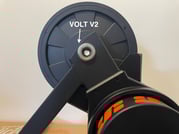
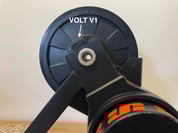
Firmware Update Instructions for VOLT V2 Trainer
To enable virtual shifting using the Zwift click on your VOLT V2 trainer, follow these steps:
- Open the JB App on your device.
- Go to Settings.
- Select Advanced Settings.
- Enable Firmware Preview.
- Go Back to Settings.
- Tap on Firmware Update.
- Tap on the three dots in the top right corner.
- Enter the Code:
JBV2ZWCL. - Tap Update.
- Wait for the LED to start flashing Blue.
- Exit the App and ensure the LED is flashing Blue before proceeding.
- Open the Zwift App.
- Connect to the controllable trainer.
- Tap on Controllers.
- Select Click. (Note: Click cannot be bridged via the trainer; it can only be used via Bluetooth connection.)
- This firmware update is specifically designed for the VOLT V2 model. Using it on a VOLT V1 model could potentially result in hardware damage.
- If you need assistance determining which model you have, please reach out for help.
By following these steps, you can successfully update your VOLT V2 trainer's firmware to enable virtual shifting. Ensure that you are using the correct model to avoid any potential issues.